

This article guides you on getting started with a Sponsored Search Canadian advertising account.
How to access your Canadian Sponsored Search advertising account
Showcase your product to millions of shoppers directly in their search results. This guide covers key topics for using our self-serve platform.
This article guides you on getting started with a Sponsored Search Canadian advertising account.
How to access your Canadian Sponsored Search advertising account
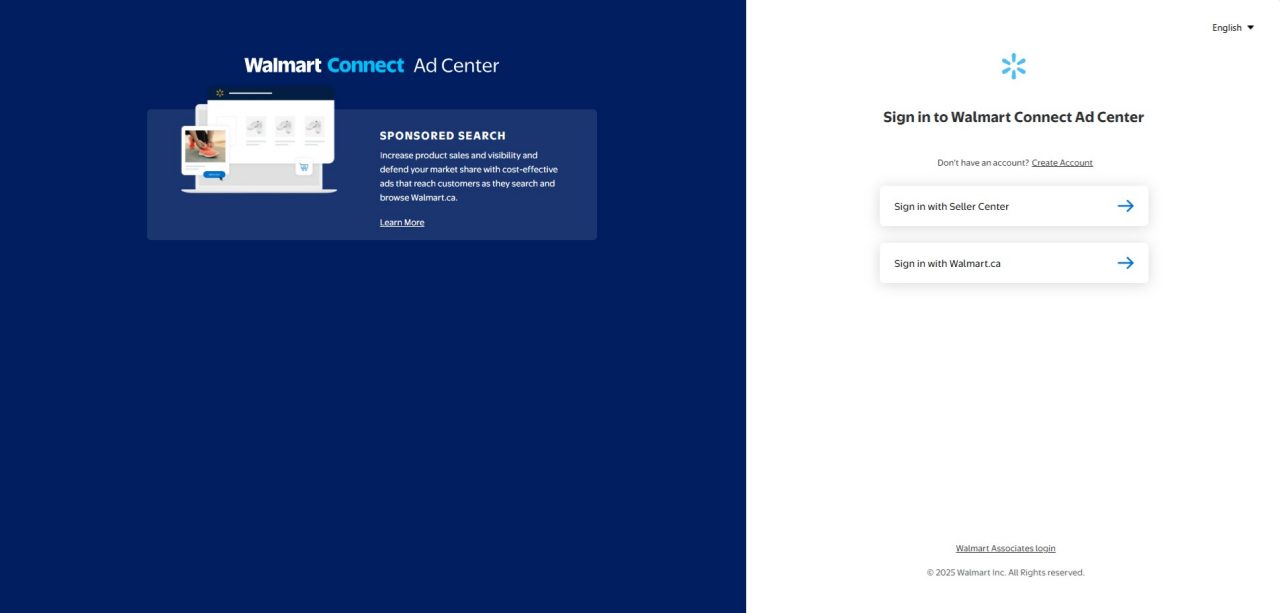
Log in to the Walmart Connect Canada Ad Center
With your Seller Center, Supplier Center, or Walmart.ca credentials.
If you’re a Walmart Canada Supplier, use the “Sign in with Supplier Center” button and use your existing credentials for Supplier Center (Retail Link / Supplier One).
If you’re a Walmart Canada Marketplace Seller, use the “Sign in with Seller Center” button and use your existing credentials for Seller Center.
If you are an Agency or Campaign Manager who is not the primary contact for the Seller Center or Supplier Center accounts but have been granted permission to manage campaigns on behalf of a Seller or Supplier, you should log in using the “Sign in with Walmart.ca” option.
When signing in, enter your work email address to access the Walmart Connect Canada Ad Center. Your email will be used to verify your account within our system.
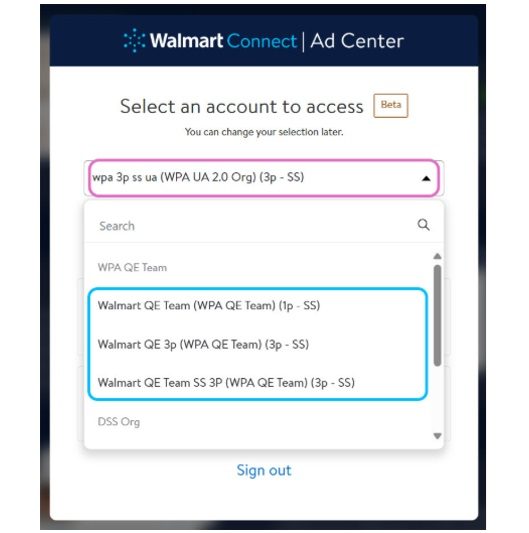
Now that you’re in the platform, select your advertising account from the dropdown menu.
You’ll then be prompted to complete a few additional steps, including two-factor authentication, to confirm your identity.
For new advertisers, select the advertising account in the drop-down where you’d like to begin running your ads.
For existing/returning advertisers, the advertising account that you last used will pre-populate in the drop-down for your convenience.
Note: The first time that existing/returning advertisers see this new interface, they will need to either search for their desired advertising account or select their desired advertising account from the drop-down.
If you have login issues:
Check with your advertising account Admin to ensure that you have been granted correct access.
If you are still having login issues, contact us at Info_WMC_ca@walmart.com.
How to request a new Sponsored Search advertising account
New Walmart Connect Canada advertisers
Request a Sponsored Search Account:
If you are a Walmart Supplier who does not have an existing Canadian Sponsored Search advertising account, please email info_WMC_CA@walmart.com with the information listed below.
If you are a new Marketplace Canada seller, Walmart Connect Canada offers a seamless experience in providing you with access to the Walmart Connect Canada Ad Center. Every two weeks, new Marketplace sellers are integrated to our Ad Center, and you will receive an onboarding email to confirm your access.
If your company is an existing Marketplace seller, but you are having trouble accessing Walmart Connect Ad Center, contact your account admin to request a change of access levels.
*To receive a Walmart Connect advertising account you must first be an approved Marketplace Seller. Sign Up Here to Become a Walmart Marketplace Canada Seller.
Receive welcome email
After our team receives all necessary information, we’ll create your Sponsored Search advertiser account.
Once it’s created, you will receive a welcome email from our team to help you get started with Sponsored Search advertising.
Marketplace sellers: Email will be sent to the Seller Center email address you provide
Walmart suppliers: Email will be sent to the Walmart.ca customer account email you shared
Frequently asked questions
Where can I find my Partner or Vendor ID?
Find your Partner or Vendor ID by logging into Seller Center or Supplier Center (Retail Link). The ID will be the number below or next your company name.
How long does the onboarding process take after I submit a request?
For Marketplace Sellers, generally, this process may take up to two weeks (ten business days) after registering as a Walmart Canada Seller, depending on your account type and the information provided.
For 1P Suppliers, generally, this process may take up to one week (five business days), depending on your account type and the information provided.
How can I get help with onboarding?
If you need additional help with onboarding that isn’t covered in this guide contact us at Info_WMC_ca@walmart.com.
How will I be charged for my ad spend?
For Marketplace Sellers, ad spend amounts will be deducted from your net sales on a bi-weekly basis.
For 1P Suppliers, campaign-level invoices will be billed monthly and can be paid via wire transfer, direct deposit, electronic funds transfer (EFT) or cheque.