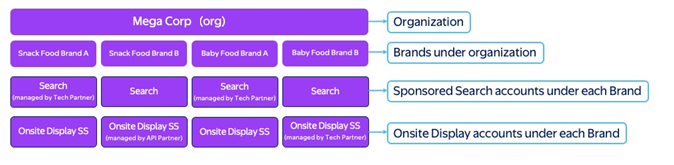
Roles definitions and permissions
Understanding different roles and their access levels within an organization is important for managing access and responsibilities effectively. Here is an overview of the roles available, and each of their permissions.
Super admin (required)
Description: With the highest level of permissions, the super admin has complete control over account creation and access to all organization data. Super admins can grant or revoke access for all users within the organization.
Key permissions:
- Can grant/revoke user and partner access for the entire organization and all accounts
- Can pause and manage new/existing ad accounts and campaigns
- Can create accounts
- Can manage and access all components including campaign management, campaign reporting, creative, Asset Library, billing management, access management
- Has access to all data within the organization and data from within all accounts under the organization
Org admin (optional)
Definition: Has access throughout the organization, including all existing or future accounts, all components, all organizational and account data. Org admins can grant or revoke access for all users (other than super admin) within the organization.
Key permissions:
- Can grant/revoke user and partner access for the entire organization and all accounts
- Cannot create or pause accounts
- Can manage campaigns and campaign reporting
- Has access to all components including campaign management, campaign reporting, creative, billing management, access management and Asset Library
- Has access to all data within the organization and data from all accounts under the organization
Org standard (optional)
Definition: Has access to a component they’re assigned to across all existing and future accounts within the organization.
Key permissions:
- Can be granted access to all components including campaign management, campaign reporting, creative, billing management, access management and Asset Library
- Note: The org standard user can have either view or edit access to each of the different components (with the exception of Billing Management, which only has edit access)
- Has access to all data within the account if they have permission to a specific component, such as reporting
- Note: If the advertiser doesn’t want to give a user access to a specific component, they can give “none" access to the specific component
Account admin
Definition: Has access to a specific account they are assigned to, including all components and users.
Key permissions:
- Can assign user and partner access for a specific account
- Can create and manage campaigns
- Has access to all components including campaign management, campaign reporting, creative, billing management, access management and Asset Library
Account standard
Definition: Has access to a component they are assigned to within an existing account.
Key permissions:
- Can be granted access to all components including campaign management, campaign reporting, creative, billing management, access management and Asset Library
- Note: The account standard user can have either view or edit access to each of the different components (with the exception of Billing Management, which only has edit access)
- Has access to all data within the account if they have permission to a specific component, such as reporting
- If the advertiser doesn’t want to give a user access to a specific component, then they can give “none"” access to the specific component
Users per role
The number of assigned user roles listed reflects the maximum allowed for each role. For example, up to five users can be assigned the super admin role.
Super admin: 5
|
Org admin: 10
|
Org standard: 20
|
Advertiser account admin: 20
|
Advertiser account standard: 100
|