



This article provides best practices for evaluating the performance of your Display campaigns.
Advertising Help Centre
Onsite Display Guide
Reach customers when they’re ready to buy and drive impact across the purchase funnel.
Finding IDs and account names
Locating your advertiser ID
Sponsored Search
You can locate your Advertiser ID by logging in to Walmart Connect Ad Center and selecting Reports, then Advertiser from the left-hand navigation menu.
Your Advertiser ID is the numeric section at the end of the URL.
https://advertising.walmart.com/ca/sp/view/report/advertiser/xxxxxx.

Display
You can locate your Advertiser ID by logging in to Walmart Connect Ad Center and locating the number at the end of the URL from any page.
Your Advertiser ID is the numeric section immediately after aid=.
https://advertising.walmart.com/ca/display?aid=xxxxxx.

Locating your campaign ID
Sponsored Search
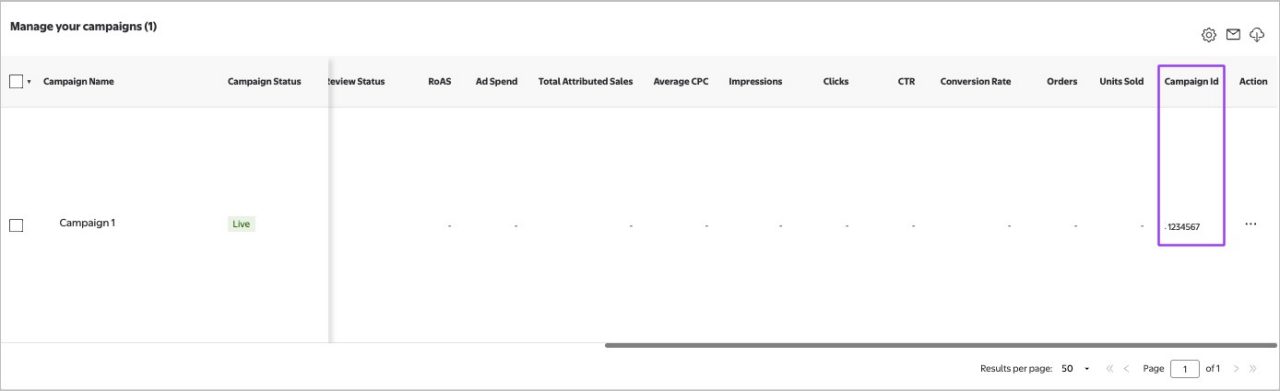
You can find your campaign ID by logging in to Walmart Connect Ad Center and clicking All Campaigns in the left-hand navigation menu.
On the All Campaigns page, scroll down to Manage your campaigns and find the campaign you are looking for. Then, scroll to the far right of the table to find the Campaign Id column.
Display
You can find your campaign ID by logging in to Walmart Connect Ad Center and clicking Campaigns in the left-hand navigation menu.
On the All Campaigns page, your Campaign ID is listed under the Campaign/Ad Group/Creatives column. Your ID is listed under your campaign title.

Locating your account name
Sponsored Search
If you only have access to one account in the Sponsored Search platform, your name will appear at the top of Walmart Connect Ad Center without a dropdown option.

If you have access to multiple accounts in the Sponsored Search platform, you will have an advertiser account dropdown list at the top left of the platform. You click on the dropdown arrow to see the full names of your advertiser accounts.

The naming structure of your account is: Account Name (Organization Name) (Advertiser Type - Demand Channel).
Note: When submitting an Advertiser Help case, please make sure to include your full advertiser account name, e.g. Test Walmart (Walmart Test) (3p-SS).
Display
When you log into the Display platform, your account name is displayed at the top of the page.

If you have access to more than one account, click the dropdown arrow to get the full names of your accounts.
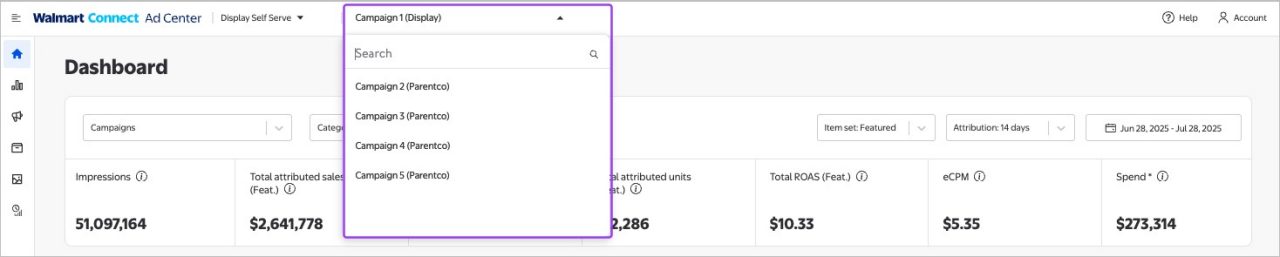
Note: When submitting an Advertiser Help case, please make sure to include your full advertiser account name, e.g. Walmart Display Test Account (Display).